> ## Documentation Index
> Fetch the complete documentation index at: https://docs-staging-update-anonymous-sessons-ea.mintlify.site/llms.txt
> Use this file to discover all available pages before exploring further.

> Learn how to store Flows integration credentials in the Vault to reference them during Forms runtime.

# Vaults

The vault lets you securely store secrets or common settings (for example: API keys, <Tooltip tip="Access Token: Authorization credential, in the form of an opaque string or JWT, used to access an API." cta="View Glossary" href="/docs/glossary?term=access+tokens">access tokens</Tooltip>, <Tooltip tip="Access Token: Authorization credential, in the form of an opaque string or JWT, used to access an API." cta="View Glossary" href="/docs/glossary?term=refresh+tokens">refresh tokens</Tooltip>) to authenticate requests with external services or integrations as vault connections.

<Callout icon="file-lines" color="#0EA5E9" iconType="regular">
  * There are connections that require the user to provide credentials (for example, with an Auth0 with a machine-to-machine (M2M) application, you generate an access token with an expiration time and a refresh token). The connection stores both tokens and generates a new access token before it expires.
  * There are external services that require authorizing scopes to generate API credentials. If you change the scopes, update the connection to those services to avoid connection issues.
  * When a connection is added, it is ready to use in your flows. Any updates to an existing connection will propagate automatically.
</Callout>

## Create and modify vault connections

Create and modify vault connections from the vault page or from the flow editor when an action requires credentials.

### Create vault connections from the vault page

Add a vault connection from the vault page by following these steps:

1. Open the Form editor by selecting **Auth0 Dashboard > Actions > Forms.**
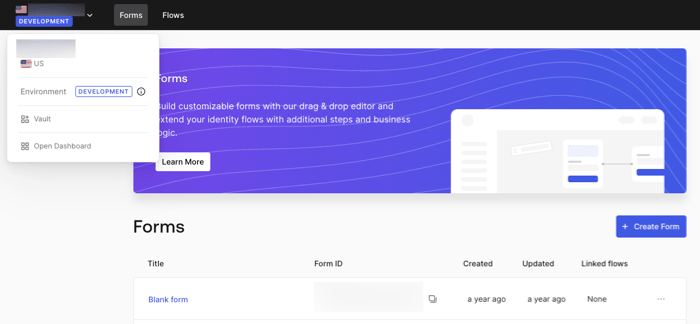
2. From the top left corner, select the tenant menu, and then **Vault** to open the vault page.
   <Frame>
     <img src="https://mintcdn.com/docs-staging-update-anonymous-sessons-ea/KUZyZ8QYVXJvgdUz/docs/images/cdy7uua7fh8z/1sPNPKO6nuEDCuiYGRWSur/d85dc616170eaf2d7d5f321750863ccf/vault-connection.png?fit=max&auto=format&n=KUZyZ8QYVXJvgdUz&q=85&s=88d0023e1b6b86aefdcd5d161ffd4a6a" alt="Dashboard > Forms > Vault" data-og-width="700" width="700" data-og-height="324" height="324" data-path="docs/images/cdy7uua7fh8z/1sPNPKO6nuEDCuiYGRWSur/d85dc616170eaf2d7d5f321750863ccf/vault-connection.png" data-optimize="true" data-opv="3" srcset="https://mintcdn.com/docs-staging-update-anonymous-sessons-ea/KUZyZ8QYVXJvgdUz/docs/images/cdy7uua7fh8z/1sPNPKO6nuEDCuiYGRWSur/d85dc616170eaf2d7d5f321750863ccf/vault-connection.png?w=280&fit=max&auto=format&n=KUZyZ8QYVXJvgdUz&q=85&s=a4b72ddf083e899488c2be0dfdfb676d 280w, https://mintcdn.com/docs-staging-update-anonymous-sessons-ea/KUZyZ8QYVXJvgdUz/docs/images/cdy7uua7fh8z/1sPNPKO6nuEDCuiYGRWSur/d85dc616170eaf2d7d5f321750863ccf/vault-connection.png?w=560&fit=max&auto=format&n=KUZyZ8QYVXJvgdUz&q=85&s=cb445ffe0b2b9fdb75aef8a2f9e00619 560w, https://mintcdn.com/docs-staging-update-anonymous-sessons-ea/KUZyZ8QYVXJvgdUz/docs/images/cdy7uua7fh8z/1sPNPKO6nuEDCuiYGRWSur/d85dc616170eaf2d7d5f321750863ccf/vault-connection.png?w=840&fit=max&auto=format&n=KUZyZ8QYVXJvgdUz&q=85&s=5418be8a4ebf5933e2e1817e27b64704 840w, https://mintcdn.com/docs-staging-update-anonymous-sessons-ea/KUZyZ8QYVXJvgdUz/docs/images/cdy7uua7fh8z/1sPNPKO6nuEDCuiYGRWSur/d85dc616170eaf2d7d5f321750863ccf/vault-connection.png?w=1100&fit=max&auto=format&n=KUZyZ8QYVXJvgdUz&q=85&s=0bff26d73092035e8c3a4b0540194251 1100w, https://mintcdn.com/docs-staging-update-anonymous-sessons-ea/KUZyZ8QYVXJvgdUz/docs/images/cdy7uua7fh8z/1sPNPKO6nuEDCuiYGRWSur/d85dc616170eaf2d7d5f321750863ccf/vault-connection.png?w=1650&fit=max&auto=format&n=KUZyZ8QYVXJvgdUz&q=85&s=156ccb34b64cadd816a391c2bb04172e 1650w, https://mintcdn.com/docs-staging-update-anonymous-sessons-ea/KUZyZ8QYVXJvgdUz/docs/images/cdy7uua7fh8z/1sPNPKO6nuEDCuiYGRWSur/d85dc616170eaf2d7d5f321750863ccf/vault-connection.png?w=2500&fit=max&auto=format&n=KUZyZ8QYVXJvgdUz&q=85&s=d9d43ed2c521cff2f970ee47ad5d93cf 2500w" />
   </Frame>
3. Select **Add Vault Connection**.
4. Select the desired action and **Continue**.
5. Add a vault **Connection name** and select **Continue**.
6. Enter the credentials.
   If you don't have the specific credentials, you can select **Create an empty connection** and add the credentials later. Empty connections have an orange icon indicating missing credentials.
7. select **Add Vault Connection**.

### Create vault connections from the flow editor

Add a vault connection from a flow action, for example: Twilio by following these steps:

1. Open the Flow editor by selecting **Auth0 Dashboard > Actions > Forms > Flows**
2. Select a flow and add a **Send SMS with Twilio** action.
3. From the **Vault connection** setting of the action, select the **+** Icon.

   <Frame>
     <img src="https://mintcdn.com/docs-staging-update-anonymous-sessons-ea/J0N_PGHEoILMSnmV/docs/images/cdy7uua7fh8z/1AsaznhRKxm5LZxPlcbfUw/10e5a8af700aab909f5b03fcd266da7e/twilio-vault-connection.png?fit=max&auto=format&n=J0N_PGHEoILMSnmV&q=85&s=d88af622878b455734aaa9b8edd9139d" alt="Dashboard > Forms > Vault " data-og-width="1104" width="1104" data-og-height="191" height="191" data-path="docs/images/cdy7uua7fh8z/1AsaznhRKxm5LZxPlcbfUw/10e5a8af700aab909f5b03fcd266da7e/twilio-vault-connection.png" data-optimize="true" data-opv="3" srcset="https://mintcdn.com/docs-staging-update-anonymous-sessons-ea/J0N_PGHEoILMSnmV/docs/images/cdy7uua7fh8z/1AsaznhRKxm5LZxPlcbfUw/10e5a8af700aab909f5b03fcd266da7e/twilio-vault-connection.png?w=280&fit=max&auto=format&n=J0N_PGHEoILMSnmV&q=85&s=1111d55d53fa7741495106e7cd71d718 280w, https://mintcdn.com/docs-staging-update-anonymous-sessons-ea/J0N_PGHEoILMSnmV/docs/images/cdy7uua7fh8z/1AsaznhRKxm5LZxPlcbfUw/10e5a8af700aab909f5b03fcd266da7e/twilio-vault-connection.png?w=560&fit=max&auto=format&n=J0N_PGHEoILMSnmV&q=85&s=5d23fe18e94323d719996d412d6a7fea 560w, https://mintcdn.com/docs-staging-update-anonymous-sessons-ea/J0N_PGHEoILMSnmV/docs/images/cdy7uua7fh8z/1AsaznhRKxm5LZxPlcbfUw/10e5a8af700aab909f5b03fcd266da7e/twilio-vault-connection.png?w=840&fit=max&auto=format&n=J0N_PGHEoILMSnmV&q=85&s=84213cadbd233b05baf94bd1bbf27a03 840w, https://mintcdn.com/docs-staging-update-anonymous-sessons-ea/J0N_PGHEoILMSnmV/docs/images/cdy7uua7fh8z/1AsaznhRKxm5LZxPlcbfUw/10e5a8af700aab909f5b03fcd266da7e/twilio-vault-connection.png?w=1100&fit=max&auto=format&n=J0N_PGHEoILMSnmV&q=85&s=d2ba70a8fd295589724bb6c897d6f128 1100w, https://mintcdn.com/docs-staging-update-anonymous-sessons-ea/J0N_PGHEoILMSnmV/docs/images/cdy7uua7fh8z/1AsaznhRKxm5LZxPlcbfUw/10e5a8af700aab909f5b03fcd266da7e/twilio-vault-connection.png?w=1650&fit=max&auto=format&n=J0N_PGHEoILMSnmV&q=85&s=82b75d1e1f5b6ca72596ebcb4bdfdf72 1650w, https://mintcdn.com/docs-staging-update-anonymous-sessons-ea/J0N_PGHEoILMSnmV/docs/images/cdy7uua7fh8z/1AsaznhRKxm5LZxPlcbfUw/10e5a8af700aab909f5b03fcd266da7e/twilio-vault-connection.png?w=2500&fit=max&auto=format&n=J0N_PGHEoILMSnmV&q=85&s=b7008b3ee68a133b0a243ffc016db597 2500w" />
   </Frame>
4. Add a vault **Connection name** and select **Continue**.
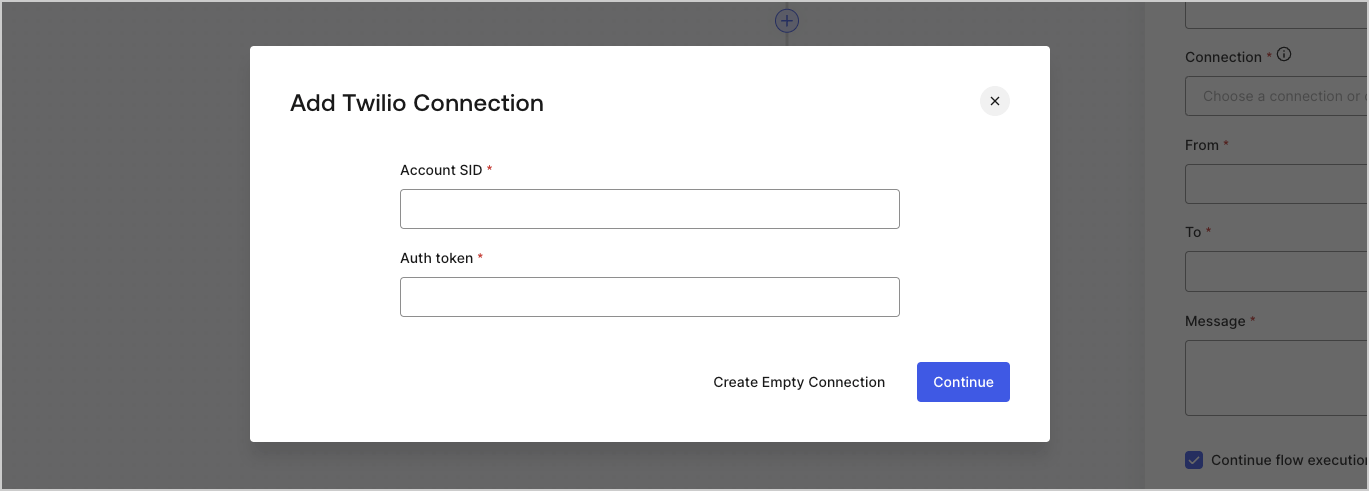
5. Enter the credentials.
   If you don't have the specific credentials, you can select **Create an empty connection** and add the credentials later. Empty connections have an orange icon indicating missing credentials.
   <Frame>
     <img src="https://mintcdn.com/docs-staging-update-anonymous-sessons-ea/aicfNob5mXwd0ttg/docs/images/cdy7uua7fh8z/yobXanutPRCO3FWek8cOk/bc29e39fb8593cff35e2738234bfe6fe/twilio-vault-settings.png?fit=max&auto=format&n=aicfNob5mXwd0ttg&q=85&s=807277eda41039ed8ea7152140039665" alt="Dashboard > Forms > Vault > Twilio connection settings" data-og-width="1369" width="1369" data-og-height="491" height="491" data-path="docs/images/cdy7uua7fh8z/yobXanutPRCO3FWek8cOk/bc29e39fb8593cff35e2738234bfe6fe/twilio-vault-settings.png" data-optimize="true" data-opv="3" srcset="https://mintcdn.com/docs-staging-update-anonymous-sessons-ea/aicfNob5mXwd0ttg/docs/images/cdy7uua7fh8z/yobXanutPRCO3FWek8cOk/bc29e39fb8593cff35e2738234bfe6fe/twilio-vault-settings.png?w=280&fit=max&auto=format&n=aicfNob5mXwd0ttg&q=85&s=a75582508461d66bccc3b2fe04e87d67 280w, https://mintcdn.com/docs-staging-update-anonymous-sessons-ea/aicfNob5mXwd0ttg/docs/images/cdy7uua7fh8z/yobXanutPRCO3FWek8cOk/bc29e39fb8593cff35e2738234bfe6fe/twilio-vault-settings.png?w=560&fit=max&auto=format&n=aicfNob5mXwd0ttg&q=85&s=689b5b9ddd94eeb48e45200a486ead29 560w, https://mintcdn.com/docs-staging-update-anonymous-sessons-ea/aicfNob5mXwd0ttg/docs/images/cdy7uua7fh8z/yobXanutPRCO3FWek8cOk/bc29e39fb8593cff35e2738234bfe6fe/twilio-vault-settings.png?w=840&fit=max&auto=format&n=aicfNob5mXwd0ttg&q=85&s=76da00f70aba17657151f960ff5164a6 840w, https://mintcdn.com/docs-staging-update-anonymous-sessons-ea/aicfNob5mXwd0ttg/docs/images/cdy7uua7fh8z/yobXanutPRCO3FWek8cOk/bc29e39fb8593cff35e2738234bfe6fe/twilio-vault-settings.png?w=1100&fit=max&auto=format&n=aicfNob5mXwd0ttg&q=85&s=0a3a511ea842d4d556dcf135ab7e6baf 1100w, https://mintcdn.com/docs-staging-update-anonymous-sessons-ea/aicfNob5mXwd0ttg/docs/images/cdy7uua7fh8z/yobXanutPRCO3FWek8cOk/bc29e39fb8593cff35e2738234bfe6fe/twilio-vault-settings.png?w=1650&fit=max&auto=format&n=aicfNob5mXwd0ttg&q=85&s=1602cc800b50d79c72993feb4a4745ca 1650w, https://mintcdn.com/docs-staging-update-anonymous-sessons-ea/aicfNob5mXwd0ttg/docs/images/cdy7uua7fh8z/yobXanutPRCO3FWek8cOk/bc29e39fb8593cff35e2738234bfe6fe/twilio-vault-settings.png?w=2500&fit=max&auto=format&n=aicfNob5mXwd0ttg&q=85&s=e7d519ade8e96e464ab94df03e4cb203 2500w" />
   </Frame>
6. Select **Add Vault Connection.**
