> ## Documentation Index
> Fetch the complete documentation index at: https://docs-staging-update-anonymous-sessons-ea.mintlify.site/llms.txt
> Use this file to discover all available pages before exploring further.

> Learn how to configure an update policy form using Forms for Actions for users to review and accept new terms of service or consent updates.

# Use Cases: Configure an update policy form using Forms

<Card title="Before you start">
  1. Create a [Machine-to-Machine Application](/docs/get-started/auth0-overview/create-applications/machine-to-machine-apps) with the following scopes enabled:

  * `read:users`
  * `update:users`
  * `create:users`
  * `read:users_app_metadata`
  * `update:users_app_metadata`
  * `create:users_app_metadata`

  2. Add a [Vault connection](/docs/customize/forms/vault) using the M2M application credentials.
</Card>

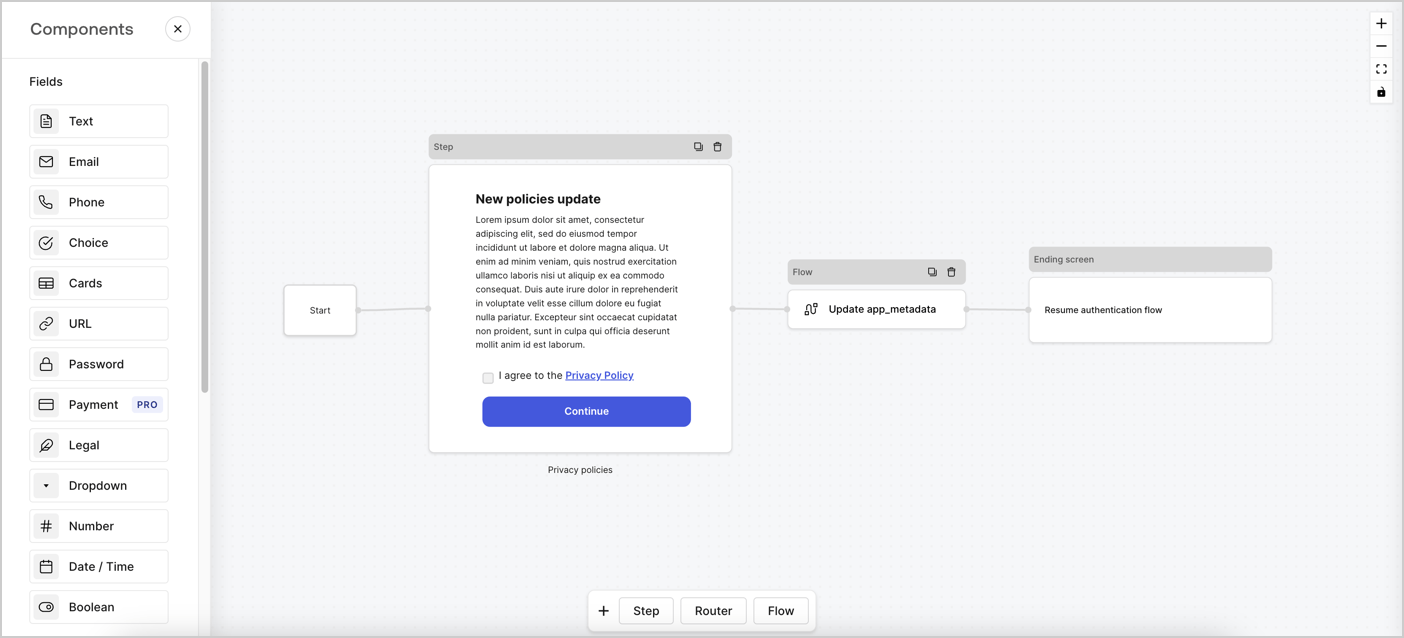
Forms for Actions allows you to create custom privacy policies flows and store the consent under the `app_metadata` object.
<Frame>
  <img src="https://mintcdn.com/docs-staging-update-anonymous-sessons-ea/PNS305OgYH0rOlt7/docs/images/cdy7uua7fh8z/6i68dMvHDTijfRmSgN1x8Q/ad900e7d4c0fb34645921435472b8684/privavy-policy-form.png?fit=max&auto=format&n=PNS305OgYH0rOlt7&q=85&s=640d29754947c38ac201010851e32a4f" alt="Dashboard > Actions > Forms > Privacy policy use case" data-og-width="1404" width="1404" data-og-height="638" height="638" data-path="docs/images/cdy7uua7fh8z/6i68dMvHDTijfRmSgN1x8Q/ad900e7d4c0fb34645921435472b8684/privavy-policy-form.png" data-optimize="true" data-opv="3" srcset="https://mintcdn.com/docs-staging-update-anonymous-sessons-ea/PNS305OgYH0rOlt7/docs/images/cdy7uua7fh8z/6i68dMvHDTijfRmSgN1x8Q/ad900e7d4c0fb34645921435472b8684/privavy-policy-form.png?w=280&fit=max&auto=format&n=PNS305OgYH0rOlt7&q=85&s=ea4f510ed6acacd0983942362c3ad229 280w, https://mintcdn.com/docs-staging-update-anonymous-sessons-ea/PNS305OgYH0rOlt7/docs/images/cdy7uua7fh8z/6i68dMvHDTijfRmSgN1x8Q/ad900e7d4c0fb34645921435472b8684/privavy-policy-form.png?w=560&fit=max&auto=format&n=PNS305OgYH0rOlt7&q=85&s=876913e8f6f83d0a7fbbd7473cbd1c9e 560w, https://mintcdn.com/docs-staging-update-anonymous-sessons-ea/PNS305OgYH0rOlt7/docs/images/cdy7uua7fh8z/6i68dMvHDTijfRmSgN1x8Q/ad900e7d4c0fb34645921435472b8684/privavy-policy-form.png?w=840&fit=max&auto=format&n=PNS305OgYH0rOlt7&q=85&s=adbc8f8cec5f4e5bc2cd60b6e1ada2ae 840w, https://mintcdn.com/docs-staging-update-anonymous-sessons-ea/PNS305OgYH0rOlt7/docs/images/cdy7uua7fh8z/6i68dMvHDTijfRmSgN1x8Q/ad900e7d4c0fb34645921435472b8684/privavy-policy-form.png?w=1100&fit=max&auto=format&n=PNS305OgYH0rOlt7&q=85&s=267ff7645c4d45b47aac4083a9c9dffa 1100w, https://mintcdn.com/docs-staging-update-anonymous-sessons-ea/PNS305OgYH0rOlt7/docs/images/cdy7uua7fh8z/6i68dMvHDTijfRmSgN1x8Q/ad900e7d4c0fb34645921435472b8684/privavy-policy-form.png?w=1650&fit=max&auto=format&n=PNS305OgYH0rOlt7&q=85&s=a8b03f7cebb4d22bda39654e7d76b4ec 1650w, https://mintcdn.com/docs-staging-update-anonymous-sessons-ea/PNS305OgYH0rOlt7/docs/images/cdy7uua7fh8z/6i68dMvHDTijfRmSgN1x8Q/ad900e7d4c0fb34645921435472b8684/privavy-policy-form.png?w=2500&fit=max&auto=format&n=PNS305OgYH0rOlt7&q=85&s=02c121b88076dccda49ccb0a3dad6b87 2500w" />
</Frame>

The sections below outline how you can create an Update Policy form using nodes and flows, along with steps for adding your form to a [Post Login](/docs/customize/actions/explore-triggers/signup-and-login-triggers/login-trigger) Action.

## Create a form from scratch

Follow these steps to create a form to gather information:

1. Open the Form editor by selecting **Auth0 Dashboard > Actions > Forms.**
2. Select **Create Form** > **Start from scratch**.

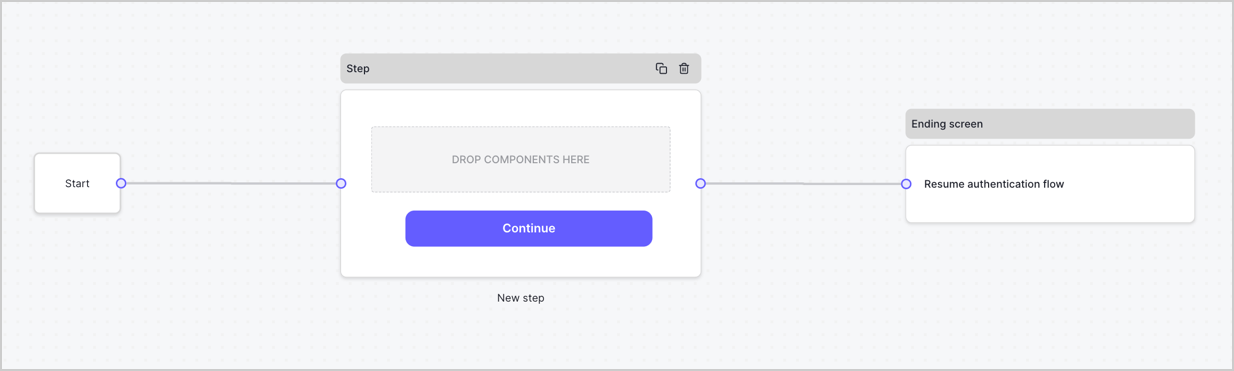
By default, a new form contains a Start node, a Step node, and an Ending screen node.
<Frame>
  <img src="https://mintcdn.com/docs-staging-update-anonymous-sessons-ea/D0Y-PVVz1ukwMxCO/docs/images/cdy7uua7fh8z/2TZ9jSjgEcARFpULI6hz4R/a4319a1bd482f2ee5cc23100fdb2f42c/New-form-Forms-for-action-use-case.png?fit=max&auto=format&n=D0Y-PVVz1ukwMxCO&q=85&s=adaf1ed2aeebd7c5235777ee92cd8e38" alt="Dashboard > Forms > Use Cases > Form" data-og-width="1234" width="1234" data-og-height="371" height="371" data-path="docs/images/cdy7uua7fh8z/2TZ9jSjgEcARFpULI6hz4R/a4319a1bd482f2ee5cc23100fdb2f42c/New-form-Forms-for-action-use-case.png" data-optimize="true" data-opv="3" srcset="https://mintcdn.com/docs-staging-update-anonymous-sessons-ea/D0Y-PVVz1ukwMxCO/docs/images/cdy7uua7fh8z/2TZ9jSjgEcARFpULI6hz4R/a4319a1bd482f2ee5cc23100fdb2f42c/New-form-Forms-for-action-use-case.png?w=280&fit=max&auto=format&n=D0Y-PVVz1ukwMxCO&q=85&s=6c5dcb02d160fa65a781463cee30e583 280w, https://mintcdn.com/docs-staging-update-anonymous-sessons-ea/D0Y-PVVz1ukwMxCO/docs/images/cdy7uua7fh8z/2TZ9jSjgEcARFpULI6hz4R/a4319a1bd482f2ee5cc23100fdb2f42c/New-form-Forms-for-action-use-case.png?w=560&fit=max&auto=format&n=D0Y-PVVz1ukwMxCO&q=85&s=f9c725a2b779005a2e7cd551630a537a 560w, https://mintcdn.com/docs-staging-update-anonymous-sessons-ea/D0Y-PVVz1ukwMxCO/docs/images/cdy7uua7fh8z/2TZ9jSjgEcARFpULI6hz4R/a4319a1bd482f2ee5cc23100fdb2f42c/New-form-Forms-for-action-use-case.png?w=840&fit=max&auto=format&n=D0Y-PVVz1ukwMxCO&q=85&s=3e96c6fb1bc1679bf71ef8b6dbf47305 840w, https://mintcdn.com/docs-staging-update-anonymous-sessons-ea/D0Y-PVVz1ukwMxCO/docs/images/cdy7uua7fh8z/2TZ9jSjgEcARFpULI6hz4R/a4319a1bd482f2ee5cc23100fdb2f42c/New-form-Forms-for-action-use-case.png?w=1100&fit=max&auto=format&n=D0Y-PVVz1ukwMxCO&q=85&s=50072ecb41d11bfefdadaf304ddc0504 1100w, https://mintcdn.com/docs-staging-update-anonymous-sessons-ea/D0Y-PVVz1ukwMxCO/docs/images/cdy7uua7fh8z/2TZ9jSjgEcARFpULI6hz4R/a4319a1bd482f2ee5cc23100fdb2f42c/New-form-Forms-for-action-use-case.png?w=1650&fit=max&auto=format&n=D0Y-PVVz1ukwMxCO&q=85&s=a154e2407ab59411335fa8463cc1c209 1650w, https://mintcdn.com/docs-staging-update-anonymous-sessons-ea/D0Y-PVVz1ukwMxCO/docs/images/cdy7uua7fh8z/2TZ9jSjgEcARFpULI6hz4R/a4319a1bd482f2ee5cc23100fdb2f42c/New-form-Forms-for-action-use-case.png?w=2500&fit=max&auto=format&n=D0Y-PVVz1ukwMxCO&q=85&s=208f158e497ff2182ef4a03fdb40242b 2500w" />
</Frame>

### Configure the Step node

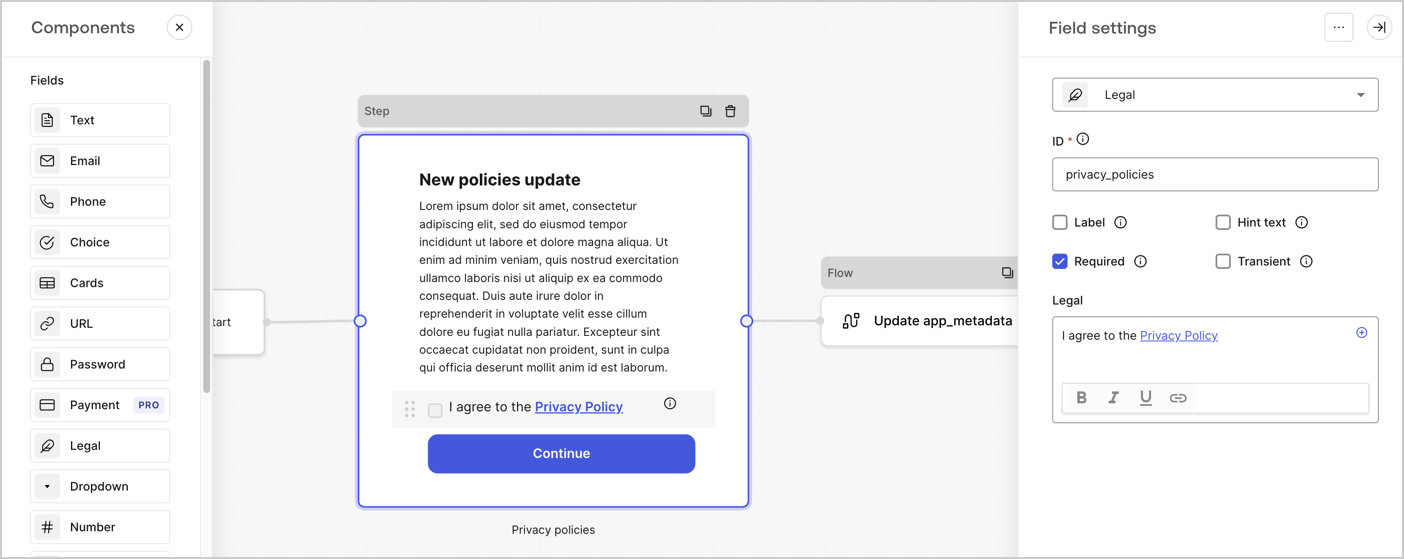
The Step node is the graphical interface visible to users. Add [Fields](/docs/customize/forms/nodes-and-components) to the Step node to collect the new agreement acceptance value by following these steps:

1. Drag a **Rich text** field from the **Components menu** into the **Step** node.

   * **Rich text**: Enter a description of your privacy policies updates.
   * Select **Save**.
2. Drag a **Legal** field into the **Step** node.

   * **ID**: Enter `privacy_policies`.
   * **Required**: Enable the checkbox.
   * **Legal**: Enter `I agree to the Privacy Policy`.
   * Select **Save**.
3. Select **Publish** to save.
<Frame>
  <img src="https://mintcdn.com/docs-staging-update-anonymous-sessons-ea/UZwMKkhNpeWp2SPw/docs/images/cdy7uua7fh8z/59zFFjQjAnjogkc2QGIqqJ/0ad66b1b636544122aa4e65968b76c2c/privacy-policy-step-node.png?fit=max&auto=format&n=UZwMKkhNpeWp2SPw&q=85&s=f682fce1af1401940509cbbc4c00a39b" alt="Dashboard > Actions > Forms > Use case privacy policy step node" data-og-width="1404" width="1404" data-og-height="559" height="559" data-path="docs/images/cdy7uua7fh8z/59zFFjQjAnjogkc2QGIqqJ/0ad66b1b636544122aa4e65968b76c2c/privacy-policy-step-node.png" data-optimize="true" data-opv="3" srcset="https://mintcdn.com/docs-staging-update-anonymous-sessons-ea/UZwMKkhNpeWp2SPw/docs/images/cdy7uua7fh8z/59zFFjQjAnjogkc2QGIqqJ/0ad66b1b636544122aa4e65968b76c2c/privacy-policy-step-node.png?w=280&fit=max&auto=format&n=UZwMKkhNpeWp2SPw&q=85&s=2bd83cd239065615979d1e43b58689e3 280w, https://mintcdn.com/docs-staging-update-anonymous-sessons-ea/UZwMKkhNpeWp2SPw/docs/images/cdy7uua7fh8z/59zFFjQjAnjogkc2QGIqqJ/0ad66b1b636544122aa4e65968b76c2c/privacy-policy-step-node.png?w=560&fit=max&auto=format&n=UZwMKkhNpeWp2SPw&q=85&s=9c4bfd7a6dc74cc071ceccb6c4979dee 560w, https://mintcdn.com/docs-staging-update-anonymous-sessons-ea/UZwMKkhNpeWp2SPw/docs/images/cdy7uua7fh8z/59zFFjQjAnjogkc2QGIqqJ/0ad66b1b636544122aa4e65968b76c2c/privacy-policy-step-node.png?w=840&fit=max&auto=format&n=UZwMKkhNpeWp2SPw&q=85&s=8b982dd4b91093cd69d964accb8b72e6 840w, https://mintcdn.com/docs-staging-update-anonymous-sessons-ea/UZwMKkhNpeWp2SPw/docs/images/cdy7uua7fh8z/59zFFjQjAnjogkc2QGIqqJ/0ad66b1b636544122aa4e65968b76c2c/privacy-policy-step-node.png?w=1100&fit=max&auto=format&n=UZwMKkhNpeWp2SPw&q=85&s=236c7b562765e0420c976ca4471741b4 1100w, https://mintcdn.com/docs-staging-update-anonymous-sessons-ea/UZwMKkhNpeWp2SPw/docs/images/cdy7uua7fh8z/59zFFjQjAnjogkc2QGIqqJ/0ad66b1b636544122aa4e65968b76c2c/privacy-policy-step-node.png?w=1650&fit=max&auto=format&n=UZwMKkhNpeWp2SPw&q=85&s=1fb0458c2344bf3f595ec94bc242b4fc 1650w, https://mintcdn.com/docs-staging-update-anonymous-sessons-ea/UZwMKkhNpeWp2SPw/docs/images/cdy7uua7fh8z/59zFFjQjAnjogkc2QGIqqJ/0ad66b1b636544122aa4e65968b76c2c/privacy-policy-step-node.png?w=2500&fit=max&auto=format&n=UZwMKkhNpeWp2SPw&q=85&s=17b7962b7135bd5fda758c51bdd8129d 2500w" />
</Frame>

### Configure the Flow node

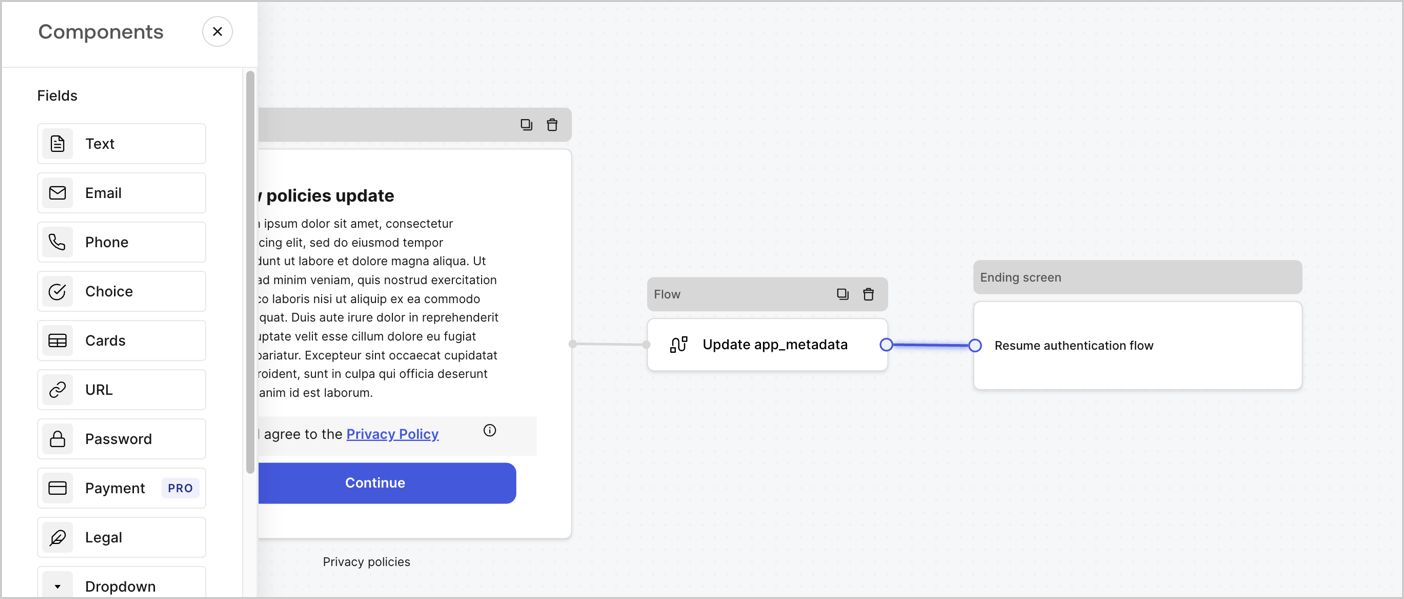
Add a **Flow** node after the **Step** node to update the `app_metadata` and resume the authentication flow by following these steps:

1. Select **Flow** from the bottom of the Form editor.
2. Remove the existing link between the **Step** and **Ending Screen** nodes.
3. Select the new **Flow** > **Click to add a flow** > **Create a new flow.**

   * Enter `Update app_metadata` in the **Name** field.
   * Select **Create**.
   * Select **Save**.
4. Link the **Flow** node to the **Step** and **Ending Screen** nodes as pictured below.
5. Select **Publish** to save.
<Frame>
  <img src="https://mintcdn.com/docs-staging-update-anonymous-sessons-ea/PNS305OgYH0rOlt7/docs/images/cdy7uua7fh8z/6YIkzm7SrpM9LW76AXuRzh/353c518fe82bbaa440836da1d83596d6/link-policies.png?fit=max&auto=format&n=PNS305OgYH0rOlt7&q=85&s=6b2d6bdf31d28819cf75c8a9489da885" alt="Dashboard > Actions > Forms > Form" data-og-width="1404" width="1404" data-og-height="599" height="599" data-path="docs/images/cdy7uua7fh8z/6YIkzm7SrpM9LW76AXuRzh/353c518fe82bbaa440836da1d83596d6/link-policies.png" data-optimize="true" data-opv="3" srcset="https://mintcdn.com/docs-staging-update-anonymous-sessons-ea/PNS305OgYH0rOlt7/docs/images/cdy7uua7fh8z/6YIkzm7SrpM9LW76AXuRzh/353c518fe82bbaa440836da1d83596d6/link-policies.png?w=280&fit=max&auto=format&n=PNS305OgYH0rOlt7&q=85&s=793b26a6599656380b25672842143ce2 280w, https://mintcdn.com/docs-staging-update-anonymous-sessons-ea/PNS305OgYH0rOlt7/docs/images/cdy7uua7fh8z/6YIkzm7SrpM9LW76AXuRzh/353c518fe82bbaa440836da1d83596d6/link-policies.png?w=560&fit=max&auto=format&n=PNS305OgYH0rOlt7&q=85&s=0d4ea0318c1a9613b1e130de4a009f89 560w, https://mintcdn.com/docs-staging-update-anonymous-sessons-ea/PNS305OgYH0rOlt7/docs/images/cdy7uua7fh8z/6YIkzm7SrpM9LW76AXuRzh/353c518fe82bbaa440836da1d83596d6/link-policies.png?w=840&fit=max&auto=format&n=PNS305OgYH0rOlt7&q=85&s=482a7a7e9494e65e41770f0da173036a 840w, https://mintcdn.com/docs-staging-update-anonymous-sessons-ea/PNS305OgYH0rOlt7/docs/images/cdy7uua7fh8z/6YIkzm7SrpM9LW76AXuRzh/353c518fe82bbaa440836da1d83596d6/link-policies.png?w=1100&fit=max&auto=format&n=PNS305OgYH0rOlt7&q=85&s=147fb03279872c6c5ac88d386548935f 1100w, https://mintcdn.com/docs-staging-update-anonymous-sessons-ea/PNS305OgYH0rOlt7/docs/images/cdy7uua7fh8z/6YIkzm7SrpM9LW76AXuRzh/353c518fe82bbaa440836da1d83596d6/link-policies.png?w=1650&fit=max&auto=format&n=PNS305OgYH0rOlt7&q=85&s=5903e9f2f8bb372a69d0ce470b0b8410 1650w, https://mintcdn.com/docs-staging-update-anonymous-sessons-ea/PNS305OgYH0rOlt7/docs/images/cdy7uua7fh8z/6YIkzm7SrpM9LW76AXuRzh/353c518fe82bbaa440836da1d83596d6/link-policies.png?w=2500&fit=max&auto=format&n=PNS305OgYH0rOlt7&q=85&s=d96c6b3cc377c034713303f615dabce4 2500w" />
</Frame>

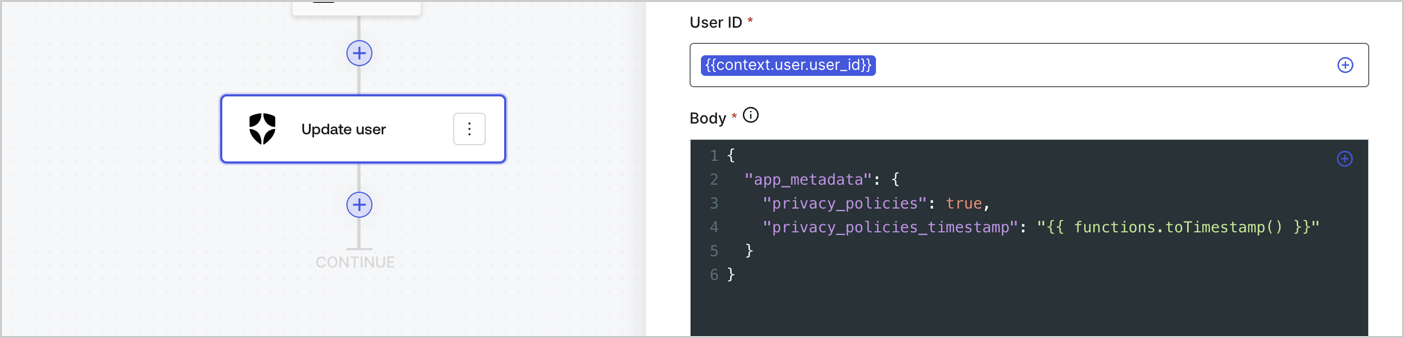
Add an Auth0 Update user action to the flow by following these steps:

1. Select the **Flow** **Update app\_metadata** > **Edit flow** to open the Flow editor in a new tab.
2. Below the StartAction, select the **+** icon to add an **Update user** action. Complete the fields below, then select **Save** to continue.

   * **Connection**: Select from the dropdown the Vault connection to your M2M application.

   * **User ID**: Enter `{{context.user.user_id}}`.

   * **Body**: Copy and paste the following code to update the app\_metadata with the privacy\_policies and privacy\_policies\_timestamp properties.

     ```text lines theme={null}
     {
       "app_metadata": {
         "privacy_policies": true,
         "privacy_policies_timestamp": "{{ functions.toTimestamp() }}"
       }
     }
     ```

   * Select **Save**.
3. Select **Publish** to save.
<Frame>
  <img src="https://mintcdn.com/docs-staging-update-anonymous-sessons-ea/SBl_CGIQHPsUzKe5/docs/images/cdy7uua7fh8z/CvMNIwWrOUwaFW4X3G28p/1fb70ae57a20749d9ffaaba8dc0b7e26/update-user-privacy.png?fit=max&auto=format&n=SBl_CGIQHPsUzKe5&q=85&s=2631acd49a3297fdd8ea775672bb91fb" alt="Dashboard > Actions > Forms > User case privacy policy code" data-og-width="1404" width="1404" data-og-height="338" height="338" data-path="docs/images/cdy7uua7fh8z/CvMNIwWrOUwaFW4X3G28p/1fb70ae57a20749d9ffaaba8dc0b7e26/update-user-privacy.png" data-optimize="true" data-opv="3" srcset="https://mintcdn.com/docs-staging-update-anonymous-sessons-ea/SBl_CGIQHPsUzKe5/docs/images/cdy7uua7fh8z/CvMNIwWrOUwaFW4X3G28p/1fb70ae57a20749d9ffaaba8dc0b7e26/update-user-privacy.png?w=280&fit=max&auto=format&n=SBl_CGIQHPsUzKe5&q=85&s=389c5257c5486d81fa197c1cad05e4a9 280w, https://mintcdn.com/docs-staging-update-anonymous-sessons-ea/SBl_CGIQHPsUzKe5/docs/images/cdy7uua7fh8z/CvMNIwWrOUwaFW4X3G28p/1fb70ae57a20749d9ffaaba8dc0b7e26/update-user-privacy.png?w=560&fit=max&auto=format&n=SBl_CGIQHPsUzKe5&q=85&s=4da15cc8012b02090864043018dbc9ec 560w, https://mintcdn.com/docs-staging-update-anonymous-sessons-ea/SBl_CGIQHPsUzKe5/docs/images/cdy7uua7fh8z/CvMNIwWrOUwaFW4X3G28p/1fb70ae57a20749d9ffaaba8dc0b7e26/update-user-privacy.png?w=840&fit=max&auto=format&n=SBl_CGIQHPsUzKe5&q=85&s=23bdfcd150c1e5197fc7dbbdc7ed32a7 840w, https://mintcdn.com/docs-staging-update-anonymous-sessons-ea/SBl_CGIQHPsUzKe5/docs/images/cdy7uua7fh8z/CvMNIwWrOUwaFW4X3G28p/1fb70ae57a20749d9ffaaba8dc0b7e26/update-user-privacy.png?w=1100&fit=max&auto=format&n=SBl_CGIQHPsUzKe5&q=85&s=3eb094ebc24db51bffe45d943d099169 1100w, https://mintcdn.com/docs-staging-update-anonymous-sessons-ea/SBl_CGIQHPsUzKe5/docs/images/cdy7uua7fh8z/CvMNIwWrOUwaFW4X3G28p/1fb70ae57a20749d9ffaaba8dc0b7e26/update-user-privacy.png?w=1650&fit=max&auto=format&n=SBl_CGIQHPsUzKe5&q=85&s=248af805d2fe08b302c08c1104122d83 1650w, https://mintcdn.com/docs-staging-update-anonymous-sessons-ea/SBl_CGIQHPsUzKe5/docs/images/cdy7uua7fh8z/CvMNIwWrOUwaFW4X3G28p/1fb70ae57a20749d9ffaaba8dc0b7e26/update-user-privacy.png?w=2500&fit=max&auto=format&n=SBl_CGIQHPsUzKe5&q=85&s=699546db5588e66f71e7ad4d101e40b1 2500w" />
</Frame>

<Callout icon="file-lines" color="#0EA5E9" iconType="regular">
  The flow **Update app\_metadata** adds a `privacy_policies true` value to the app`_metadata` object and also generates a timestamp with a [helper function.](/docs/customize/forms/variables)
</Callout>

## Retrieve the form render code

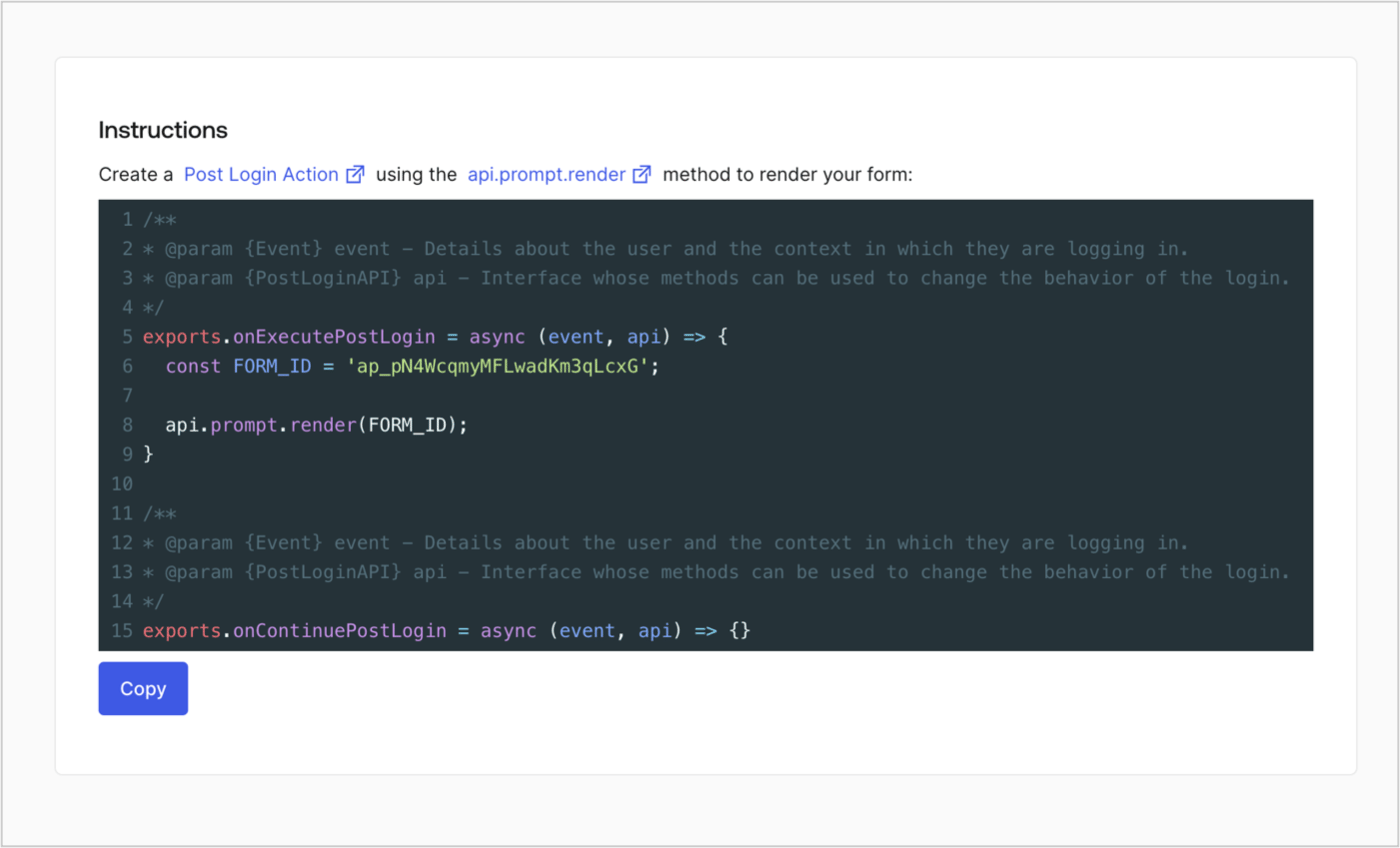
Retrieve your form render code to visually render the form with a custom Post Login Action by following these steps:

* From the Form editor, select **`<> Render`**.
* Select **Copy**.
<Frame>
  <img src="https://mintcdn.com/docs-staging-update-anonymous-sessons-ea/D0Y-PVVz1ukwMxCO/docs/images/cdy7uua7fh8z/2EIUzc539sq9lwoTKbjoJv/496a864c0fc44a782c9cadca119dbfb0/embed.png?fit=max&auto=format&n=D0Y-PVVz1ukwMxCO&q=85&s=dc4439316a9b59920f47910d0a0776ca" alt="Dashboard > Actions > Forms > Form > Embed" data-og-width="1400" width="1400" data-og-height="848" height="848" data-path="docs/images/cdy7uua7fh8z/2EIUzc539sq9lwoTKbjoJv/496a864c0fc44a782c9cadca119dbfb0/embed.png" data-optimize="true" data-opv="3" srcset="https://mintcdn.com/docs-staging-update-anonymous-sessons-ea/D0Y-PVVz1ukwMxCO/docs/images/cdy7uua7fh8z/2EIUzc539sq9lwoTKbjoJv/496a864c0fc44a782c9cadca119dbfb0/embed.png?w=280&fit=max&auto=format&n=D0Y-PVVz1ukwMxCO&q=85&s=7f02b7a83cbb526d8049a2ed1c94d600 280w, https://mintcdn.com/docs-staging-update-anonymous-sessons-ea/D0Y-PVVz1ukwMxCO/docs/images/cdy7uua7fh8z/2EIUzc539sq9lwoTKbjoJv/496a864c0fc44a782c9cadca119dbfb0/embed.png?w=560&fit=max&auto=format&n=D0Y-PVVz1ukwMxCO&q=85&s=1586a1c8c751b17ca9f13b5a38085d65 560w, https://mintcdn.com/docs-staging-update-anonymous-sessons-ea/D0Y-PVVz1ukwMxCO/docs/images/cdy7uua7fh8z/2EIUzc539sq9lwoTKbjoJv/496a864c0fc44a782c9cadca119dbfb0/embed.png?w=840&fit=max&auto=format&n=D0Y-PVVz1ukwMxCO&q=85&s=b23bd2140061eabe1c474c50e5de5d3f 840w, https://mintcdn.com/docs-staging-update-anonymous-sessons-ea/D0Y-PVVz1ukwMxCO/docs/images/cdy7uua7fh8z/2EIUzc539sq9lwoTKbjoJv/496a864c0fc44a782c9cadca119dbfb0/embed.png?w=1100&fit=max&auto=format&n=D0Y-PVVz1ukwMxCO&q=85&s=24426c6c9f92047b73ef773a6826e458 1100w, https://mintcdn.com/docs-staging-update-anonymous-sessons-ea/D0Y-PVVz1ukwMxCO/docs/images/cdy7uua7fh8z/2EIUzc539sq9lwoTKbjoJv/496a864c0fc44a782c9cadca119dbfb0/embed.png?w=1650&fit=max&auto=format&n=D0Y-PVVz1ukwMxCO&q=85&s=caa636b6944bd05d26c31bda12c7516c 1650w, https://mintcdn.com/docs-staging-update-anonymous-sessons-ea/D0Y-PVVz1ukwMxCO/docs/images/cdy7uua7fh8z/2EIUzc539sq9lwoTKbjoJv/496a864c0fc44a782c9cadca119dbfb0/embed.png?w=2500&fit=max&auto=format&n=D0Y-PVVz1ukwMxCO&q=85&s=98566ddca1a537d837b9c9072b5890e4 2500w" />
</Frame>

## Create a Post Login Action

Create a post-login Action to render your form by following these steps:

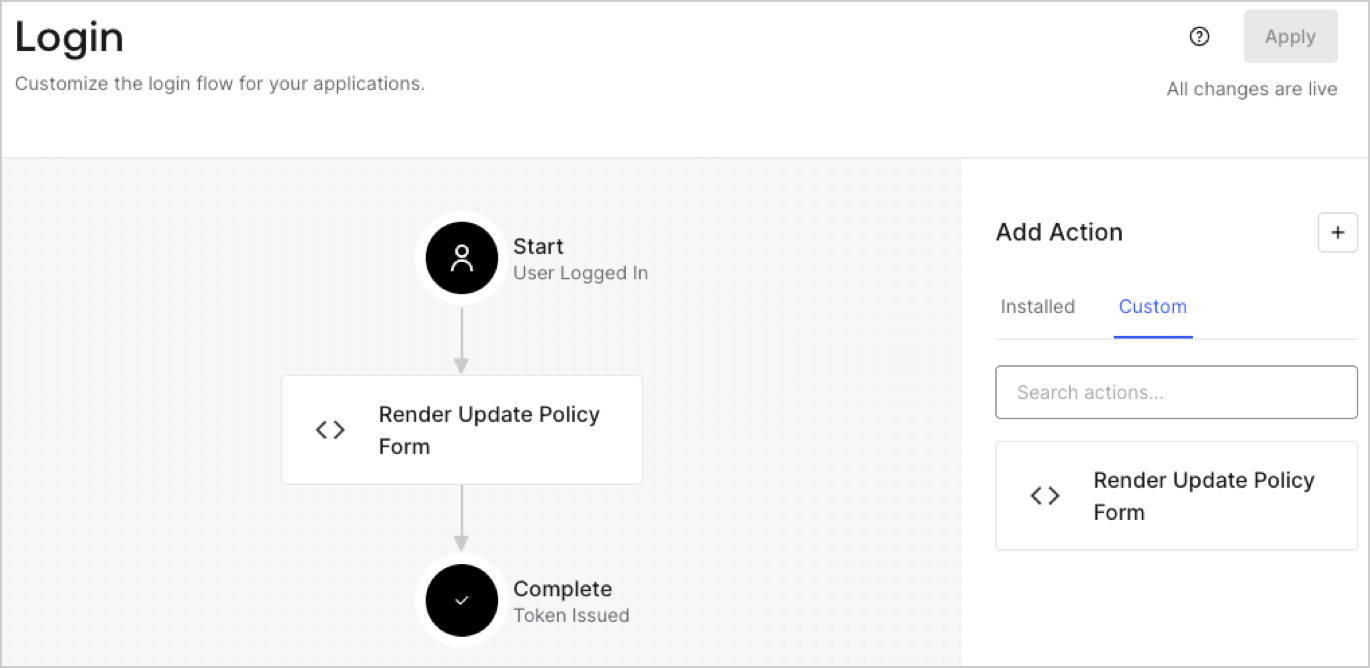
1. Navigate to **Auth0 Dashboard > Actions > Flows > Login.**
2. Select the **+** icon and Select **Build from scratch**:

   * **Name**: Enter `Render Update Policy Form`.
   * **Trigger**: Select `Login / Post Login`.
   * **Runtime**: Select the recommended version.
3. Select **Create**.

To configure the post-login Action:

1. Delete the existing code from the Code editor.
2. Paste the form render code into the Code editor.
3. Edit the code to define the conditional logic that will render the form.

   ```javascript lines theme={null}
   /**
   * @param {Event} event - Details about the user and the context in which they are logging in.
   * @param {PostLoginAPI} api - Interface whose methods can be used to change the behavior of the login.
   */
   exports.onExecutePostLogin = async (event, api) => {
     const FORM_ID = 'REPLACE_WITH_YOUR_FORM_ID';

     if (event.user.app_metadata.privacy_policies !== true) {
       api.prompt.render(FORM_ID);
     }
   }

   exports.onContinuePostLogin = async (event, api) => { }
   ```

   <Callout icon="file-lines" color="#0EA5E9" iconType="regular">
     The example code above will render the form when a user is missing the app metadata `privacy_policies` property.
   </Callout>
4. Select **Deploy.**
5. Drag and Drop the **Render Update Policy Form** Action to the **Login** flow.
   <Frame>
     <img src="https://mintcdn.com/docs-staging-update-anonymous-sessons-ea/UZwMKkhNpeWp2SPw/docs/images/cdy7uua7fh8z/5TOwDgevZsBqd7yZynUYWU/41ca909dc3007aed4f40ff794a05efa5/postlogin.png?fit=max&auto=format&n=UZwMKkhNpeWp2SPw&q=85&s=c1d2c730a74feaefd4ba9510a9d82b82" alt="Dashboard > Forms > Use Case > Render update policy form login action" data-og-width="1370" width="1370" data-og-height="668" height="668" data-path="docs/images/cdy7uua7fh8z/5TOwDgevZsBqd7yZynUYWU/41ca909dc3007aed4f40ff794a05efa5/postlogin.png" data-optimize="true" data-opv="3" srcset="https://mintcdn.com/docs-staging-update-anonymous-sessons-ea/UZwMKkhNpeWp2SPw/docs/images/cdy7uua7fh8z/5TOwDgevZsBqd7yZynUYWU/41ca909dc3007aed4f40ff794a05efa5/postlogin.png?w=280&fit=max&auto=format&n=UZwMKkhNpeWp2SPw&q=85&s=2ef383c909d629a531852fa0a271f525 280w, https://mintcdn.com/docs-staging-update-anonymous-sessons-ea/UZwMKkhNpeWp2SPw/docs/images/cdy7uua7fh8z/5TOwDgevZsBqd7yZynUYWU/41ca909dc3007aed4f40ff794a05efa5/postlogin.png?w=560&fit=max&auto=format&n=UZwMKkhNpeWp2SPw&q=85&s=d128383ec9f6f5f0a87ec7b9940ec245 560w, https://mintcdn.com/docs-staging-update-anonymous-sessons-ea/UZwMKkhNpeWp2SPw/docs/images/cdy7uua7fh8z/5TOwDgevZsBqd7yZynUYWU/41ca909dc3007aed4f40ff794a05efa5/postlogin.png?w=840&fit=max&auto=format&n=UZwMKkhNpeWp2SPw&q=85&s=d17f0918a4af869da9800fa49f8f146d 840w, https://mintcdn.com/docs-staging-update-anonymous-sessons-ea/UZwMKkhNpeWp2SPw/docs/images/cdy7uua7fh8z/5TOwDgevZsBqd7yZynUYWU/41ca909dc3007aed4f40ff794a05efa5/postlogin.png?w=1100&fit=max&auto=format&n=UZwMKkhNpeWp2SPw&q=85&s=be85fb3c81820274fa5052244e70b8dc 1100w, https://mintcdn.com/docs-staging-update-anonymous-sessons-ea/UZwMKkhNpeWp2SPw/docs/images/cdy7uua7fh8z/5TOwDgevZsBqd7yZynUYWU/41ca909dc3007aed4f40ff794a05efa5/postlogin.png?w=1650&fit=max&auto=format&n=UZwMKkhNpeWp2SPw&q=85&s=007a9ff6779c13fa812654d96baae57e 1650w, https://mintcdn.com/docs-staging-update-anonymous-sessons-ea/UZwMKkhNpeWp2SPw/docs/images/cdy7uua7fh8z/5TOwDgevZsBqd7yZynUYWU/41ca909dc3007aed4f40ff794a05efa5/postlogin.png?w=2500&fit=max&auto=format&n=UZwMKkhNpeWp2SPw&q=85&s=1ffcb832d9923f6f686e90ec9f5be87c 2500w" />
   </Frame>
6. Select **Apply.**

### Test implementation

Test the implementation by following these steps:

1. Log in with an existing user whose app`_metadata` attribute `privacy_policies` does not have a value.
2. The post-login Action in the Login flow will render the form and prompt for acceptance.
3. Select **Auth0 Dashboard > User Management > Users,** locate the user and verify that the `app_metadata` attribute `privacy_policies` contains a `true` value and a timestamp.
